CAQA PDF 2.11.9 for Windows 10 and 11

Edit, review, convert, OCR in 55 languages, sign and protect, all on your own PC. No account, no uploads, no AI credits to buy. Put it side by side with the biggest names in PDF and see for yourself.

  • Works fully offline
  • No sign in, ever
  • Comments readable in Adobe Acrobat
  • Made in Australia by CAQA
CAQA PDF
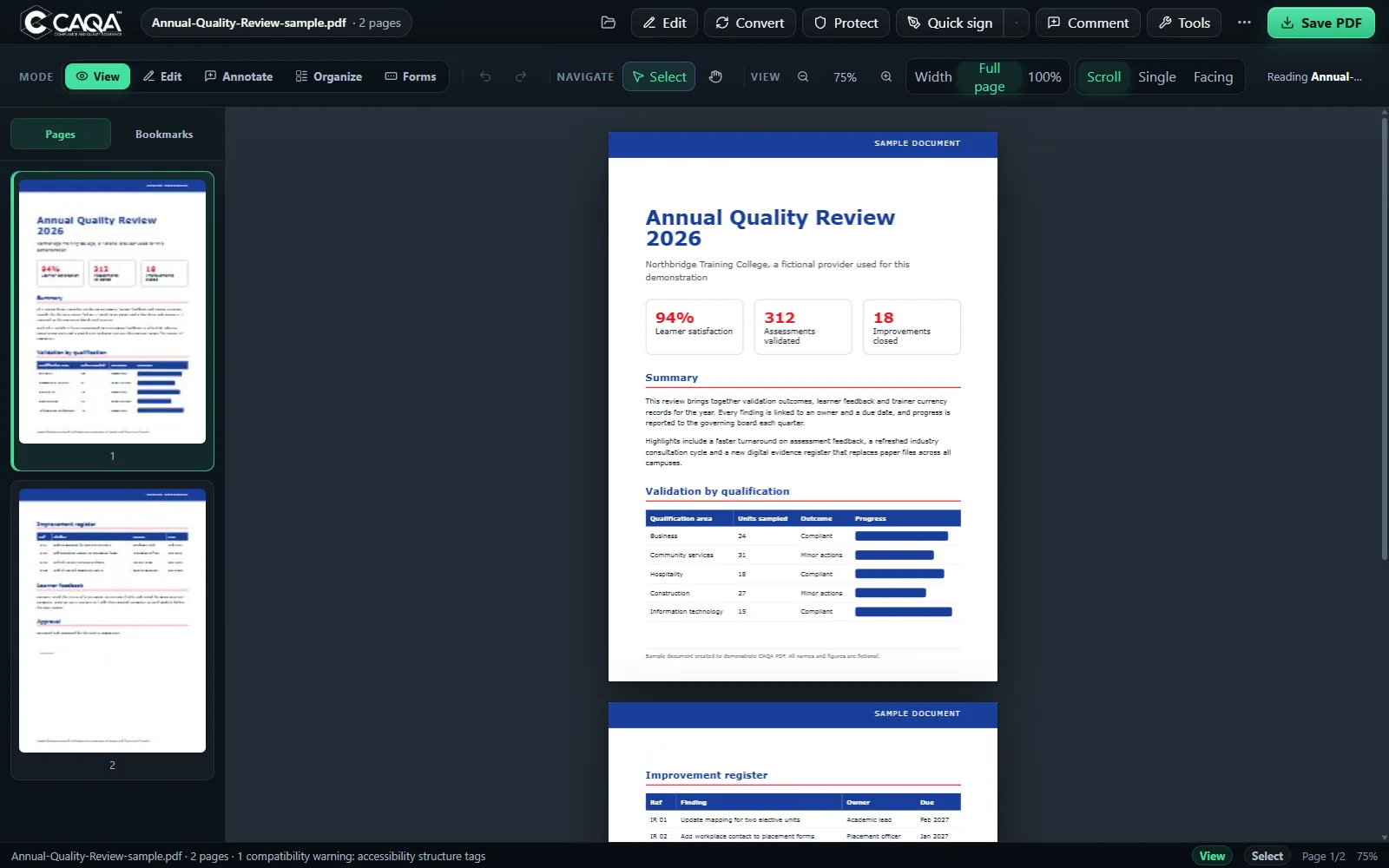
CAQA PDF showing a two page report with page thumbnails, view modes and the main toolbar
55 OCR languages, offline
0 pages uploaded
45+ tools in one window
  • 45+PDF tools in one app
  • 55OCR languages included
  • 0accounts or sign ins
  • 0AI credits to top up

01 Why it leads

Six places CAQA PDF beats the big names.

For private office work such as contracts, learner records, audits and invoices, these are the things that matter. Each claim is checked against the vendors' own websites.

  1. Nothing leaves your PC

    Every tool, from OCR to conversion and signing, runs on your own computer. There is no account and no upload step at all.

    ElsewhereOnline tools such as Smallpdf and iLovePDF process files on their servers. Acrobat links desktop work to an Adobe account.

  2. No AI credits or add on plans

    Search across your PDFs with page citations, fully offline, at no extra cost and with no text sent to an AI service.

    ElsewhereAcrobat AI Assistant needs the dearer Studio plan. Foxit, PDFelement and Smallpdf meter AI by credits or uses; PDF-XChange asks for your own AI key.

  3. 55 OCR languages built in

    Hindi, Punjabi, Chinese, Arabic, Vietnamese and 50 more ship inside the app, with automatic script detection.

    ElsewhereNone of the eight products we checked states its OCR language count on its main product or pricing page.

  4. Professional tools in one edition

    Compare, Bates numbering, certificate signing, forms, batch actions and preflight are all in the same app.

    ElsewherePDF-XChange keeps compare in Plus; ABBYY keeps compare in Corporate; Foxit lists Bates numbering as a Pro feature.

  5. Right click any PDF in Windows

    Edit, Merge, Compare, Compress, Convert, OCR and Protect straight from File Explorer, without opening the app first.

    ElsewhereOf the products checked, only the iLovePDF desktop app states right click conversion.

  6. Your work is protected

    Unsaved edits are checkpointed and restored after a crash, and every save is read back and checked byte for byte before it counts.

    UnderneathA sandboxed document view and checked channels keep files away from anything they should not touch.

02 Side by side

CAQA PDF against the industry.

Read from each vendor's own website on 22 November 2026. Where a vendor does not say, we show it as not stated rather than guess.

Feature CAQA PDFWindows desktop Adobe Acrobat ProDesktop and web Foxit PDF EditorDesktop and web PDF-XChange EditorWindows desktop ABBYY FineReader PDFDesktop Nitro PDF ProDesktop PDFelementDesktop SmallpdfOnline iLovePDFOnline and desktop
Privacy
Every tool runs on your own PC
Cloud features
Cloud AI
Not statedNot stated
Uploaded
Desktop app only
No account or sign in needed
Adobe ID
Not statedNot stated
Registration
Trial sign up
Registered trial
Login for Premium
Not stated
Search and answers without a cloud AI service
Offline cited search
AI in Studio plan
AI credits
Own AI key
Not statedNot stated
50 AI uses
AI credits
Not stated
Everyday work
Edit, annotate and comment
Convert to Word, Excel and PowerPointNot stated
OCR languages shipped and named55, offlineNot statedNot statedPacks, count not statedNot statedNot statedNot statedPremium, onlineNot stated
Review status: Open, Accepted, Rejected, CompletedNot statedNot statedNot statedNot statedNot statedNot statedNot statedNot stated
Windows right click PDF tools
7 actions
Not statedNot statedNot statedNot statedNot statedNot stated
Web only
Desktop convert
Professional tools in the standard edition
Compare two documents
Pro
Plus only
Corporate only
Not statedNot statedNot statedNot stated
Bates numbering
Pro
Pro only
Not statedNot statedNot statedNot statedNot stated
Certificate signing with your own P12 fileNot statedNot statedNot statedNot statedNot stated
Crash recovery of unsaved editsNot statedNot statedNot statedNot statedNot statedNot statedNot statedNot stated
Cost, as shown on each vendor's site
Advertised priceCAQA licenceA$31.99 a month, yearly planUS$159.99 a yearUS$79 once, PlusA$155 a yearNot shownUS$63.99 a yearA$84 a yearA$84 a year
AI at no extra cost
Offline search included
Studio A$39.99 a month
Credits
Your own AI key
Not statedStandard and above
After 50 uses
Credits
Not stated
Yes Partly or in a higher edition No, or costs extraNot stated: the vendor's site does not say

Sources, read 22 Nov 2026: adobe.com/au/acrobat/pricing, foxit.com/pdf-editor, pdf-xchange.com/product/pdf-xchange-editor, pdf.abbyy.com/pricing, gonitro.com/pricing, pdf.wondershare.com/store, smallpdf.com/pricing, ilovepdf.com/pricing and ilovepdf.com/desktop. Prices change; check the vendor's site before buying. Product names are trademarks of their owners, used only to compare.
03 Product tour

One workspace, every mode you need.

These are real screens from CAQA PDF 2.11.9. Pick a mode to see it.

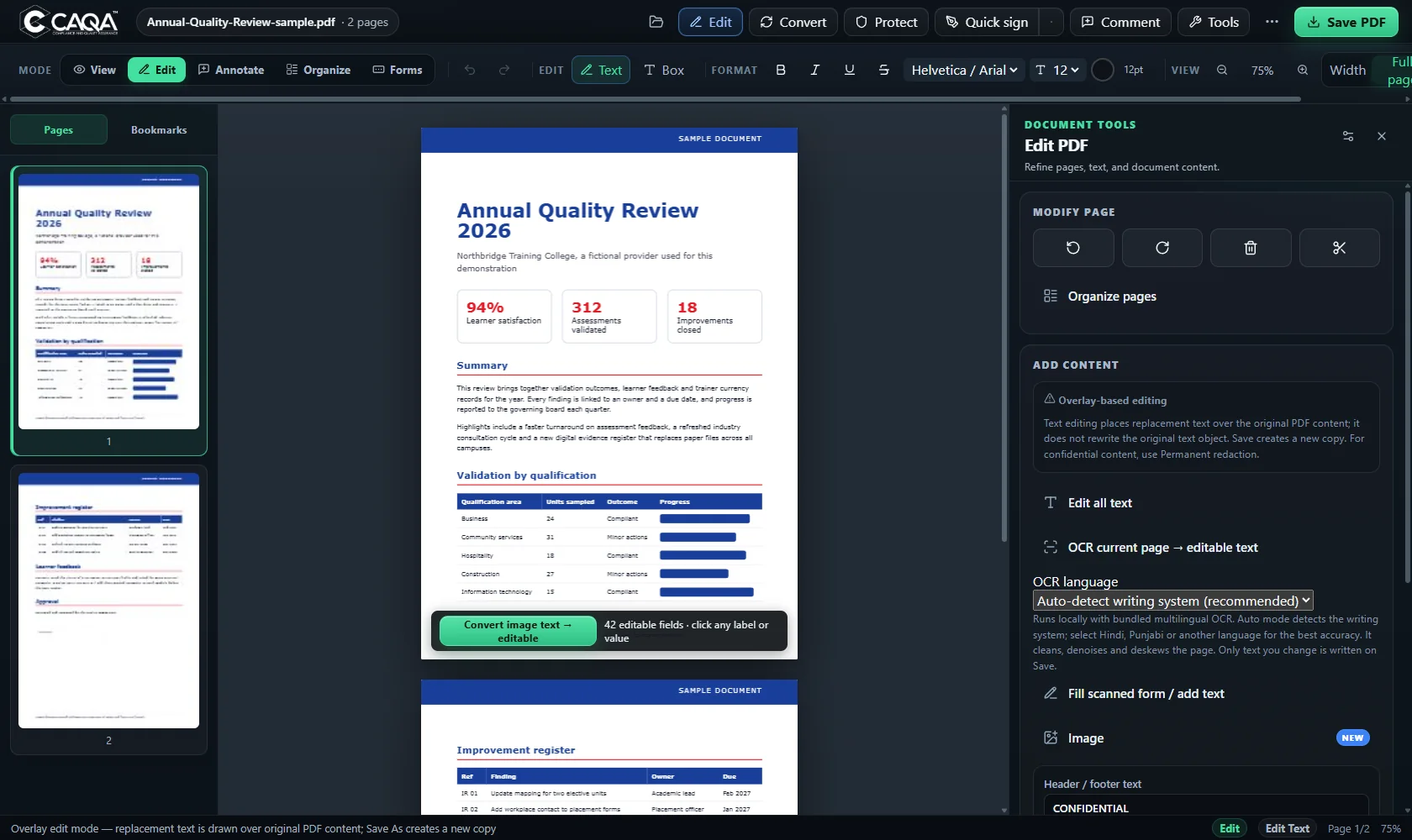
Edit mode
Edit mode with the Edit PDF panel

Edit text, images and links

Rewrite text with a format bar, add headers, footers and page numbers, place images, and add safe web and email links. Turn a scanned page into editable text with offline OCR.

  • Font, size, colour, bold and italic
  • OCR a page straight into editable text
  • Headers, footers and page numbers
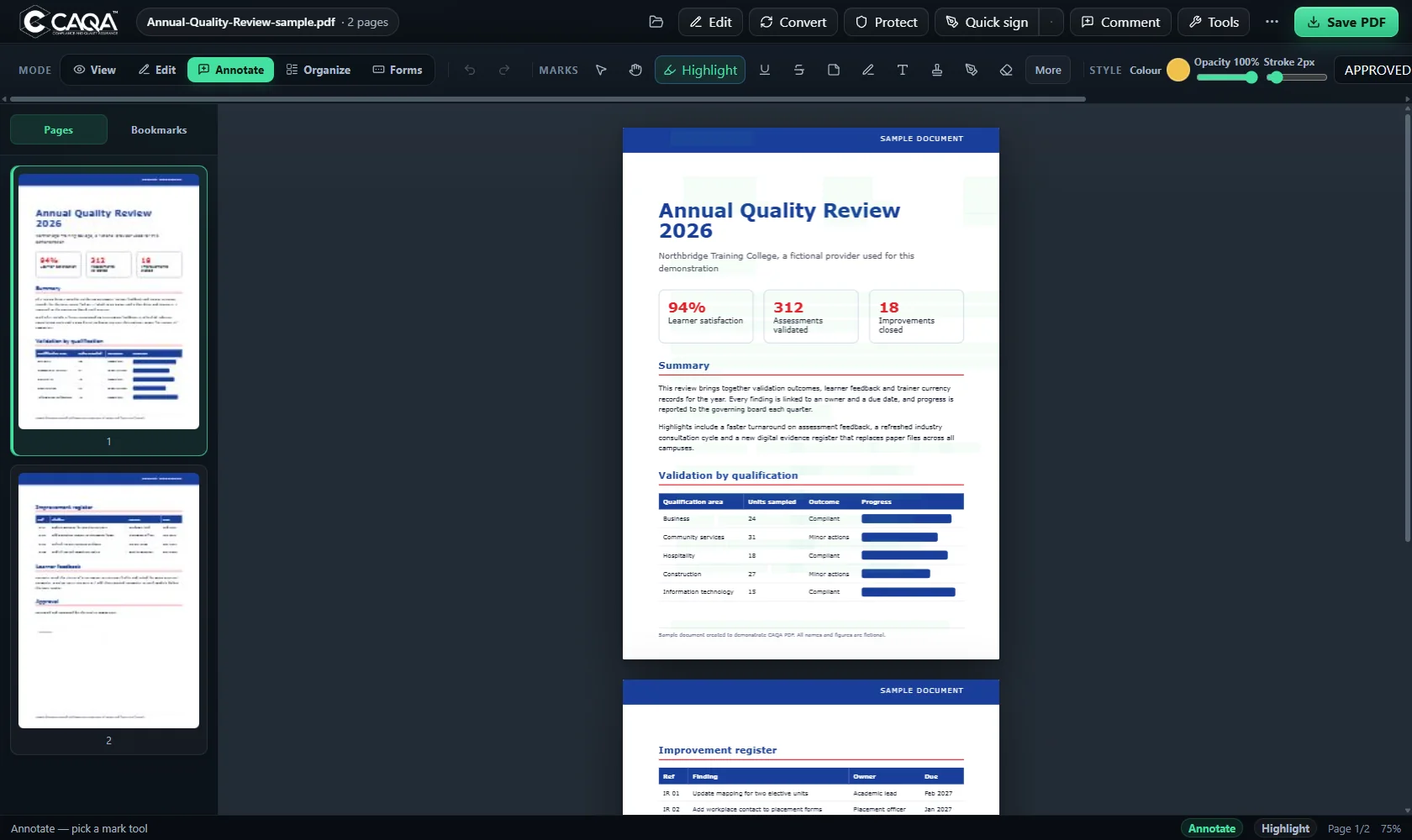
Annotate mode
Annotate mode with highlight, pen, shape and stamp tools

Mark up any page

Highlight, underline and strike text, draw with a pen, add shapes, text boxes and stamps, and measure distances. Set colour, opacity and stroke for every mark.

  • Highlight, underline, strike and pen
  • Stamps such as Approved
  • Colour, opacity and stroke controls
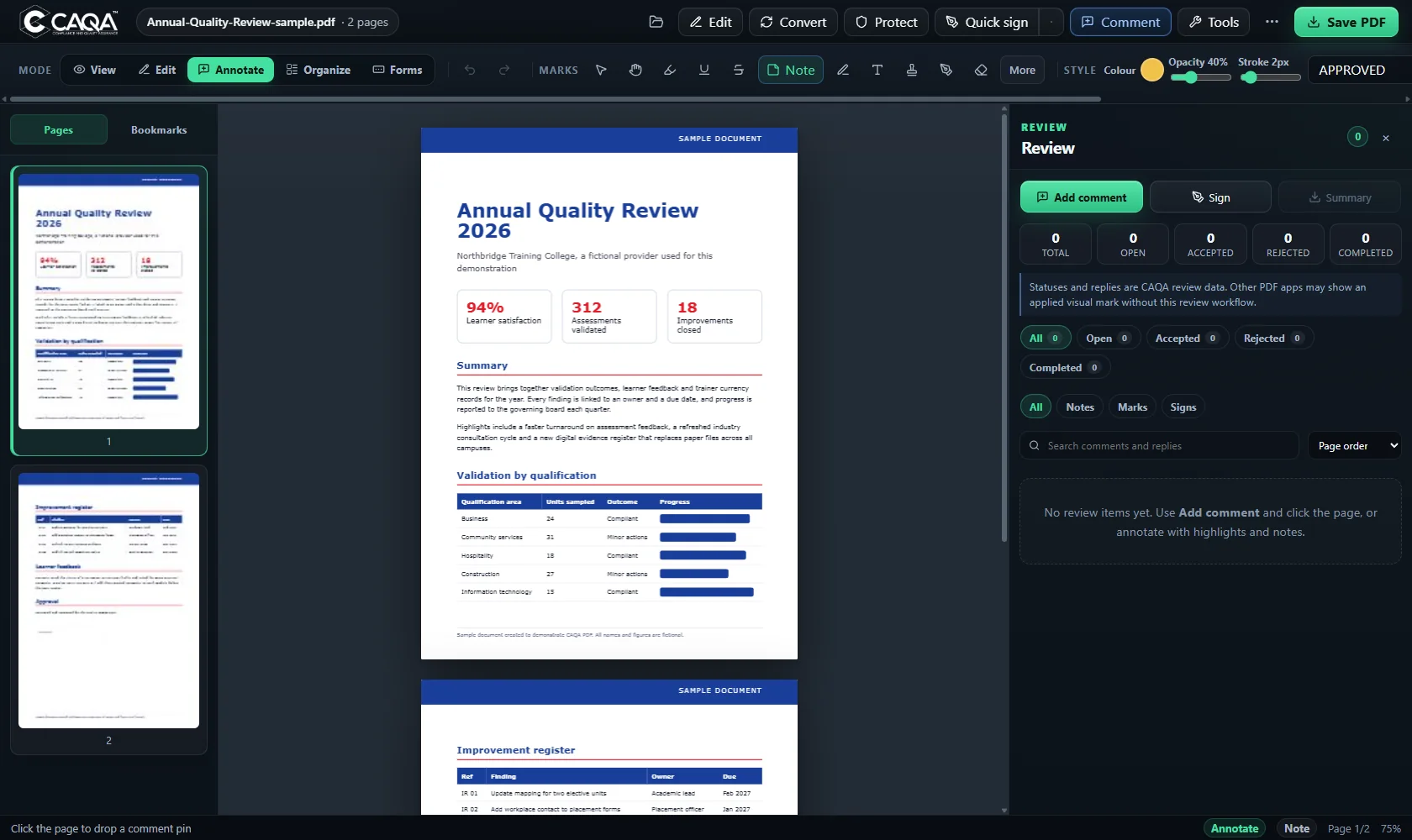
Review panel
Review panel with comment status counts and filters

Run a proper review

Drop a comment pin anywhere, reply in threads and move each item through Open, Accepted, Rejected and Completed. Filter, search and export a summary.

  • Status counts at a glance
  • Threaded replies and search
  • CSV and JSON review summaries
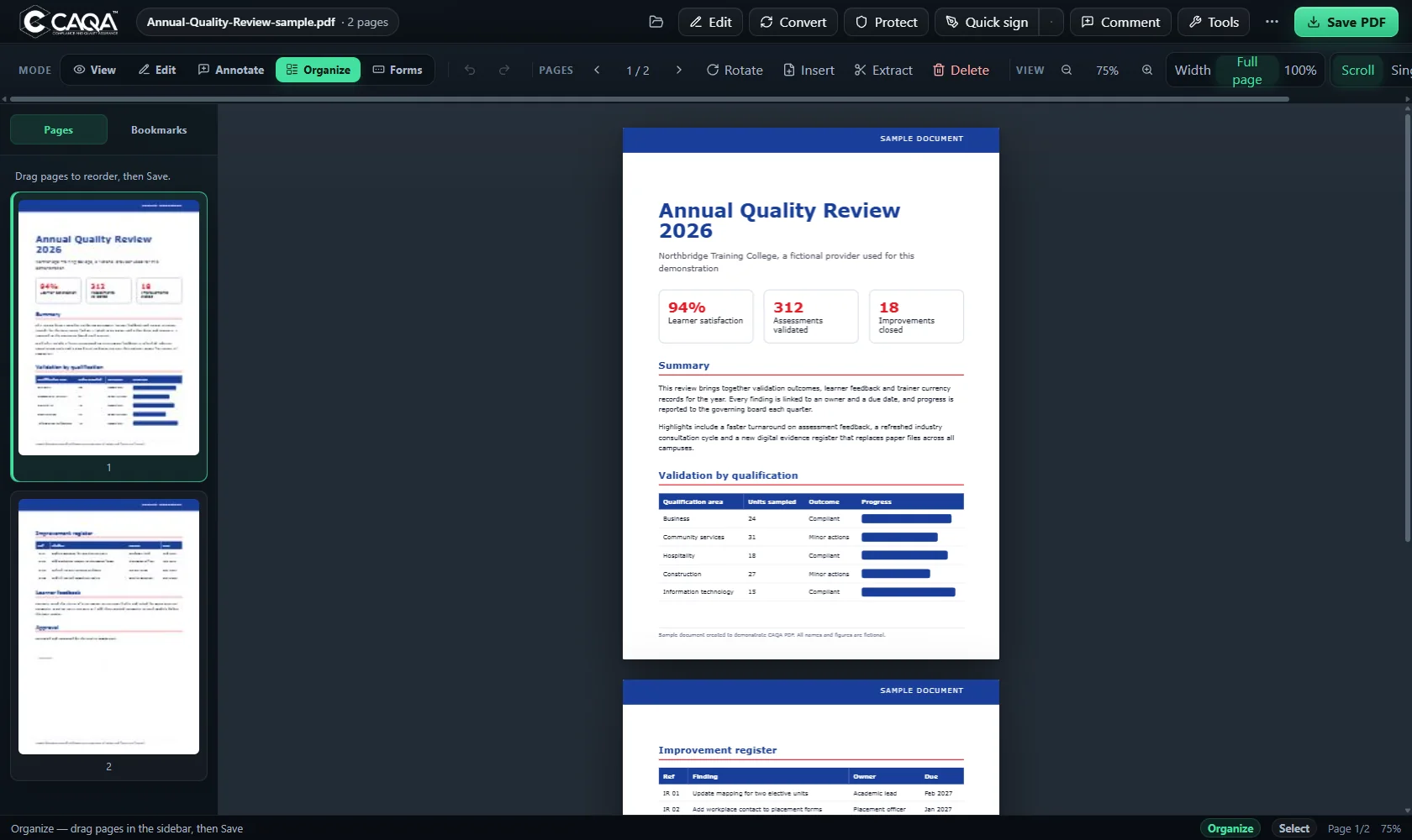
Organise mode
Organise mode with page thumbnails ready to drag

Reorder pages by dragging

Drag thumbnails to reorder, then rotate, insert blank pages, extract or delete. Merge files and split ranges from the same window.

  • Drag and drop thumbnails
  • Rotate, insert, extract, delete
  • Merge and split
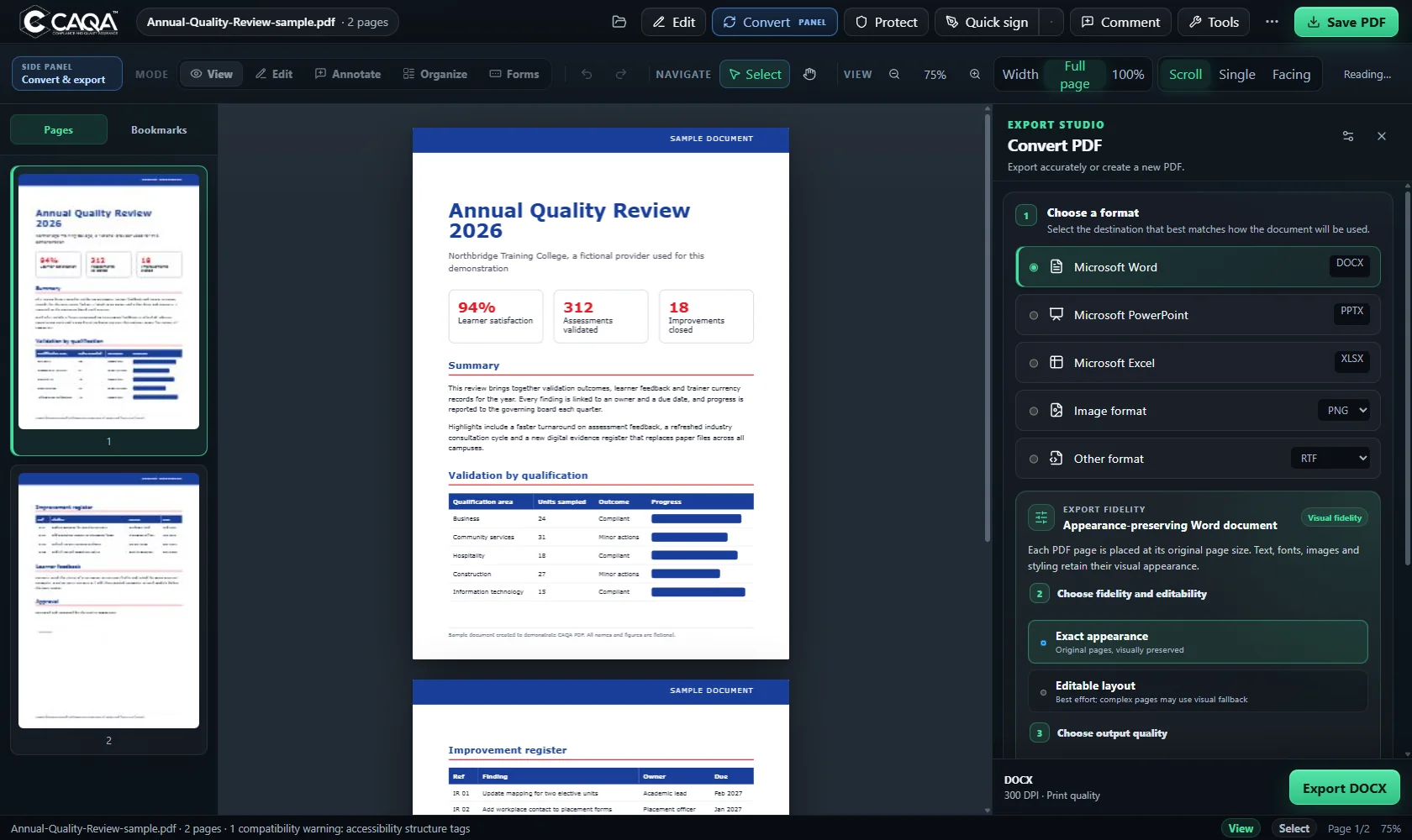
Convert panel
Convert panel with format, fidelity and quality choices

Export Studio

Pick a format, choose exact appearance or editable layout, set the quality, and export. Word, PowerPoint, Excel, images and text formats are all here.

  • Word, PowerPoint and Excel
  • Exact appearance or editable
  • Balanced, Print or Maximum quality
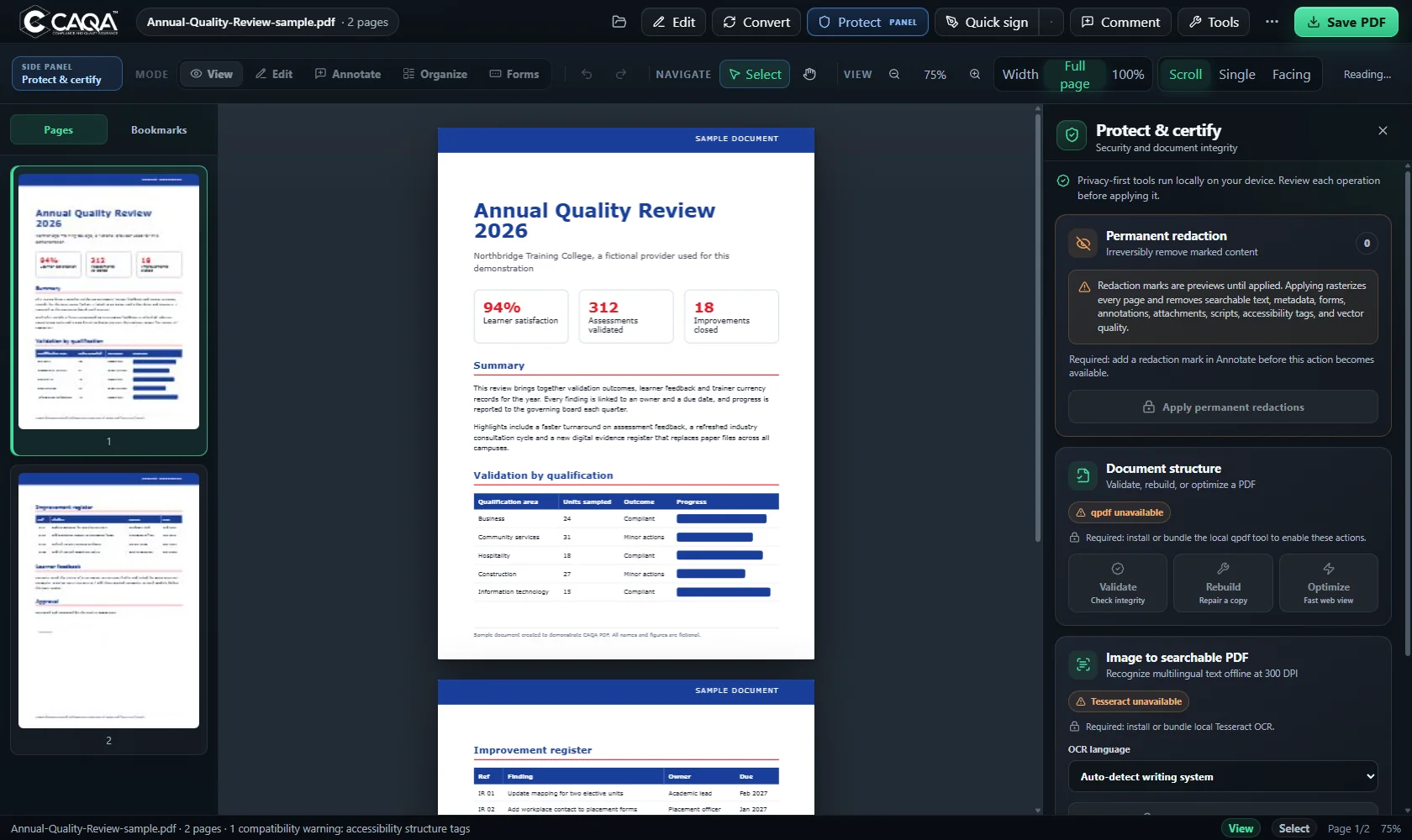
Protect panel
Protect panel with password, validation and signing tools

Protect and certify

Password protect or unlock files, validate and repair structure, make image scans searchable, and sign with your own certificate.

  • Passwords and permissions
  • Validate, rebuild and optimise
  • Certificate signing with a P12 file
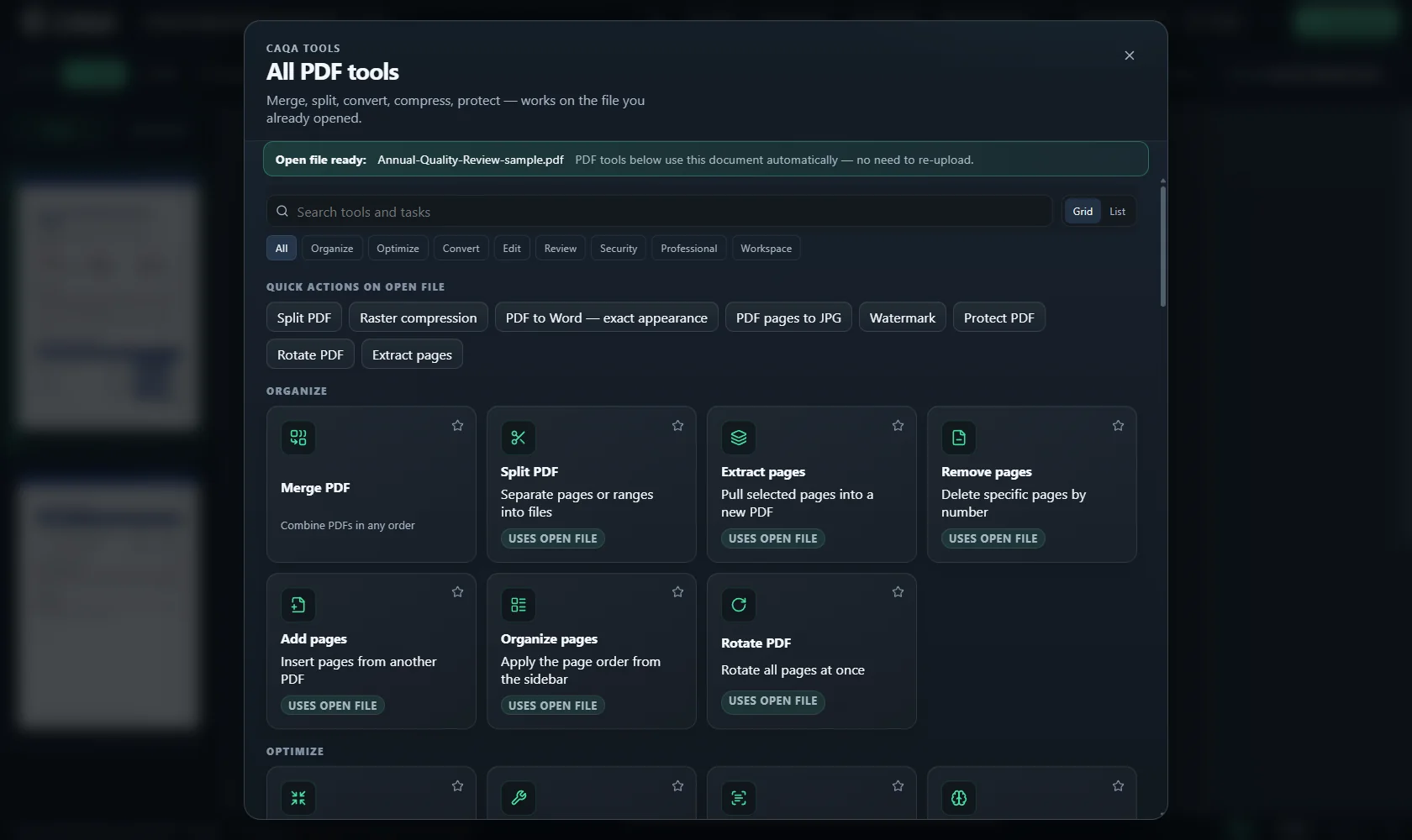
All PDF tools
The All PDF tools catalogue with search, filters and tool cards

Every tool in one catalogue

Search more than forty five tools, filter by category, star favourites and switch between grid and list. Each tool works on the file you already have open.

  • Search tools and tasks
  • Favourites and filters
  • Uses the open file, no second upload

04 Built for real paperwork

Everything a busy office does with PDFs.

Convert with the look kept

Export to Word, PowerPoint and Excel with every page kept exactly as it looks, or as editable text. Save pages as JPG or lossless PNG, or pull text into Markdown, CSV or plain text. Choose Balanced, Print or Maximum quality.

Convert panel with format, fidelity and quality choices

OCR in 55 languages

Make scans searchable or editable without the internet, with automatic script detection and clean up for skewed or noisy pages.

  • English
  • हिन्दी
  • ਪੰਜਾਬੀ
  • 中文
  • العربية
  • Tiếng Việt

Comments Acrobat can read

Notes are saved as standard PDF comments with author, date and colour, so colleagues see them in other PDF readers too.

Sign and protect

Quick visual signatures, certificate signing with your own P12 file, password protection, unlock, validate and repair.

Organise in seconds

Drag pages to reorder, rotate, insert, delete, extract, split and merge. Add Bates numbers across many files.

Review that keeps its history

Threaded replies, status counts, filters and search. Export a review summary to CSV or JSON, and reopen the file later with every comment still editable.

Review panel with comment status counts and filters

Forms

Place text boxes, checkboxes, dropdowns and lists, mark them required or read only, and add tooltips for screen readers.

Compare two versions

Side by side compare finds moved pages, changed lines and visual differences, then steps you through each change.

05 All tools

Forty five tools. One search box.

Search the catalogue, star your favourites, and every tool works on the file you already have open.

All PDF tools
The All PDF tools catalogue with search, filters and tool cards

Organise

  • Merge PDF
  • Split PDF
  • Extract pages
  • Remove pages
  • Add pages
  • Organise pages
  • Rotate PDF

Optimise

  • Compress
  • Rebuild PDF copy
  • OCR to text
  • Summarise extracted text
  • Optimiser inventory

Convert

  • PDF to Word
  • PDF to Excel
  • PDF to PowerPoint
  • Word text to PDF
  • Excel text to PDF
  • PowerPoint text to PDF
  • PDF to JPG
  • PDF to PNG
  • JPG to PDF
  • Extract text
  • PDF to CSV
  • PDF to Markdown
  • HTML to PDF
  • URL to PDF
  • Text to PDF
  • Folder to PDF

Edit

  • Watermark
  • Page numbers
  • Crop PDF
  • PDF overlay
  • Create blank PDF
  • Fillable form

Review

  • Compare PDF pages
  • Accessibility check

Security

  • Protect PDF
  • Unlock PDF
  • Certificate signing
  • Validate and repair

Professional

  • Bates numbering
  • Attachments, layers and portfolios
  • Object inventory
  • Preflight check
  • Batch actions

Workspace

  • Cited search across your PDFs
  • Windows right click menu for Edit, Merge, Compare, Compress, Convert, OCR and Protect

06 Private by design

Your documents stay on your desk.

Contracts, learner records and financial papers never leave your PC, because CAQA PDF has nowhere to send them.

The internet is

On

  • OCRRuns on your PC
  • ConversionRuns on your PC
  • CompressionRuns on your PC
  • SigningRuns on your PC
  • Cited searchRuns on your PC

CAQA PDF works with the network unplugged. Flip the switch: nothing in this list changes.

  • Works offline. OCR, conversion, compression and signing run locally. No account, no sign in.
  • Sandboxed. The document view runs in a locked down sandbox and only talks to the app through checked channels.
  • Checked saves. Each saved file is read back and compared byte for byte before your work is marked as saved.
  • Honest labels. Every feature carries an internal test gate, and anything not yet proven is labelled as such inside the app.

07 Questions

Good to know.

Does CAQA PDF upload my files?

No. Every tool runs on your own computer. CAQA PDF does not need an account and works with the network unplugged.

Which versions of Windows does it support?

Windows 10 and Windows 11, 64 bit. It installs for all users under Program Files, or runs as a portable app that keeps its data beside the program. Mac and mobile versions are not available today.

Can I make it my default PDF app?

Yes. The installer registers CAQA PDF as a PDF handler, then you choose it in Windows Default apps. It also adds Open in CAQA PDF and a CAQA PDF tools menu when you right click a PDF.

Will people using Adobe Acrobat see my comments?

Yes. Notes are saved as standard PDF comments with author, text, colour and dates; this was checked in Adobe Acrobat. Review status and threaded replies are kept in the file for CAQA PDF.

How was the comparison made?

We read each vendor's own product and pricing pages on 22 November 2026. Where a vendor does not state something, the table says so instead of guessing. Prices change, so check the vendor's site before buying.

Which OCR languages are included?

55 language packs ship with the app, including English, Hindi, Punjabi, Chinese, Arabic and Vietnamese, with automatic script detection.

CAQA

Put a complete PDF office on your PC.

CAQA PDF 2.11.9 for Windows 10 and 11, 64 bit. Installer and portable editions.

CAQA PDF is a proprietary product of CAQA. Authorised use only.